
GameChanger
GameChanger MediaSports
4.49.92K Reviews
- Version
- 2026.44.0.0
- Installs
- 5.00M
- Age Rating
- Everyone
Screenshots

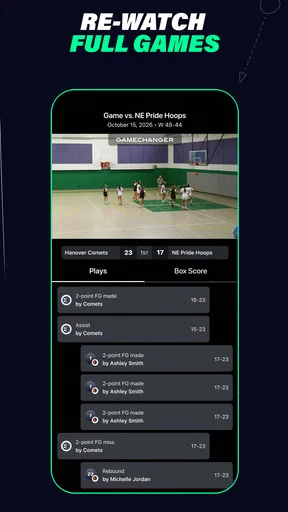
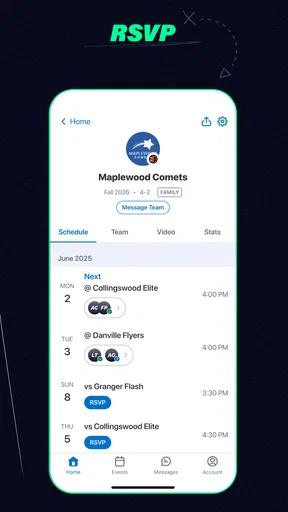
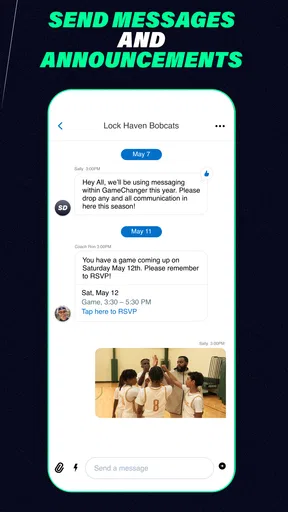
Our Review of GameChanger
 Analysis by Appyee
When I’m following a youth game, I want to watch the play rather than keep one eye on a paper scorebook. GameChanger brings scoring, stats and ways to follow a game together, which can make the day easier for coaches, families and fans. I find it most useful when a team wants to keep a shared record of what is happening, not merely check the final score.
Quick actions matter on game day
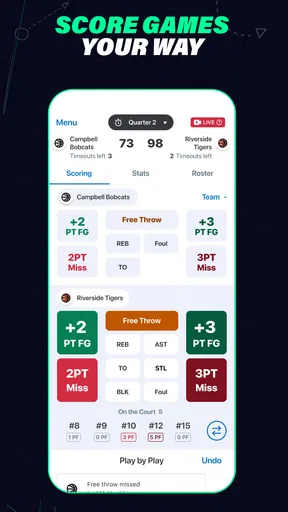
The app is built around moments when there is little time to stop and navigate. Recording a play as it happens is useful, but it also asks the scorer to pay close attention: a wrong tap or a missed event can affect the record that follows. I’d give the person scoring a few minutes to become familiar with the workflow before a close game, rather than expecting them to learn it while trying to watch every pitch.
That small bit of preparation can make a real difference. If you are the designated scorer, decide in advance which person will handle the phone and avoid passing it around during an inning. A single person keeping the record is less likely to lose track of the current situation, while another adult can focus on the players or help answer questions from the sideline.
Busy games reveal the trade-offs
GameChanger can be asked to do several jobs at once: capture events, present statistics and help people away from the field follow along. That combination is valuable, but it also means the app is not a substitute for watching the game. The scorer still needs to interpret what happened and enter it correctly. When play moves quickly, attention is the main constraint, not simply the number of buttons on a screen.
For a parent who wants to watch a child’s at-bat, scorekeeping at the same time may be a poor fit. I’d choose one role for that game: enjoy the action, or take responsibility for the record. If the team needs both, sharing duties is more sensible than expecting one person to do both well.
Reliability depends on the whole setup
A digital record is only useful if the person entering it stays engaged and the device remains usable. I would check the phone’s battery before leaving and bring a practical charging option for a long day, especially if I also planned to use live video. This is ordinary preparation, not a guarantee of uninterrupted service; streaming and outdoor conditions can make any phone-based workflow less dependable than a paper backup.
For an important game, I’d keep a simple fallback in mind. A small scorebook or notes on paper can help preserve key events if the phone needs attention. The point is not to duplicate every statistic, but to avoid having no record at all if the scorer is interrupted. Afterward, the team can decide whether it is worth reconciling those notes with the digital game record.
Speed is partly a matter of practice
I would not judge the experience by opening the app once at home. The useful test is whether the scorer can find the relevant action and enter it without losing sight of the game. A quick run-through before the first pitch helps reveal whether the chosen person is comfortable with the controls. It also gives the team a chance to settle who is scoring and who is simply following the game.
On a slower day, entering plays can feel straightforward. In a close inning, the same task can demand more attention, particularly for someone unfamiliar with scoring. That is why I see ease of use as a combination of the app and the user’s preparation. Teams that rotate scorers may want a consistent handoff routine so the next person knows what has already been recorded.
Where it fits among sports tools
Compared with a paper scorebook, GameChanger can make game information easier to share and review, while paper remains simple and independent of a phone. Compared with a team messaging thread, it gives game events and statistics a more structured place instead of scattering updates through conversation. A messaging app may still be better for general planning, such as coordinating rides or telling teammates about a schedule change.
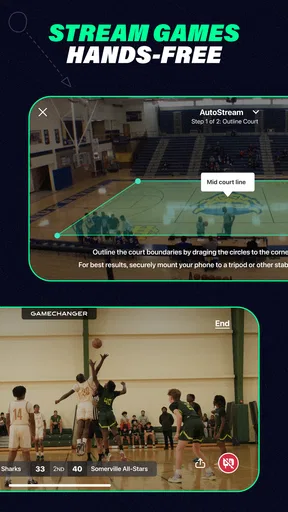
Live video is another reason someone might choose this kind of tool, but it is not the right answer for every family. If a relative only needs an occasional update, a shared message may be enough. If they want to follow the flow of a game from elsewhere, live coverage can be more useful. Either way, I would treat the scorer’s attention and the team’s chosen workflow as more important than trying to use every available option.
The app is aimed at youth sports and is published by GameChanger Media. It is a free sports app, with optional in-app purchases listed from $7.99 to $99.99 per item, so I would check what a particular paid option includes before deciding it is necessary. Its age rating is Everyone. It has a 4.5 average from around 27,000 ratings, and more than 1 million installs, which suggests it has found a broad audience among people who want game-day tools in one place.
Getting Started with GameChanger
GameChanger is available on both Android and iOS, and downloading it was a breeze. Once installed, you’re greeted with a user-friendly interface that's as intuitive as they come. I didn’t have to dig through menus to find what I needed – everything was right where I expected it to be.
Setting Up Your Team
One of the first things I did was set up my team. The app guides you step-by-step, making it simple to add players, coaches, and even fans who want to follow along. You can input details like player positions and stats, which is super handy.
There’s even an option to import team rosters, which was a big time-saver for me. Instead of manually entering each player’s info, I could just upload a CSV file. Talk about efficiency!
Live Game Scoring
Now, onto the heart of the app – live game scoring. During a game, I could easily keep track of every play. The app allows you to note down scores, hits, and errors in real-time. It’s like having a digital scorebook that never misses a beat.
The highlight for me was the pitch-by-pitch tracking. If you’re a stats nerd like I am, this feature is pure gold. You get detailed breakdowns of every pitch, which is invaluable for analyzing performance.
Broadcasting the Game
Another cool feature is the ability to broadcast games live. Your friends, family, or fans who couldn’t make it to the game can follow along from anywhere. It’s like having your personal sports channel.
I tried it out, and the response was fantastic. People loved being able to tune in and get live updates. Plus, it’s a great way to keep everyone engaged with the team’s progress.
Post-Game Features
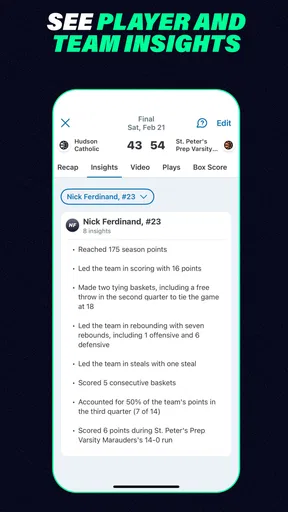
After the game, GameChanger doesn’t just pack up and leave. The app provides detailed post-game reports and stats. I could easily review the team’s performance, which is perfect for post-game analysis sessions.
The stats are presented in a clear and concise manner. You can see everything from batting averages to fielding percentages, helping you understand where the team shines and where there’s room for improvement.
Sharing and Community
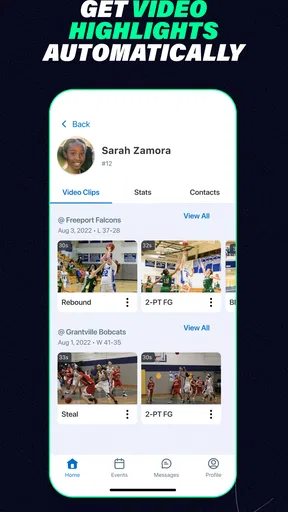
Sharing highlights and stats with the community is a breeze. The app allows you to share game moments on social media or directly with team members. It’s a great way to boost team morale and keep everyone in the loop.
There’s also a fan community aspect where supporters can leave comments and cheer on their favorite players. It’s a small feature, but it really adds to the sense of community around the team.
My Final Thoughts
Overall, GameChanger is a must-have for anyone involved in sports, whether you’re a coach, a parent, or just a fan. It simplifies the process of tracking games and keeping everyone informed. The combination of live scoring, broadcasting, and detailed stats makes it stand out from other apps.
If you’re tired of juggling paper scorebooks and missing plays, give GameChanger a shot. It’s like having a personal assistant in the stands, and it might just be the game-changer you need.
Who will get the most from it?
I think the clearest fit is a team that has someone willing to take on scoring and wants families to follow the same game information. Coaches can use the recorded events as a starting point for a conversation about a game, while relatives who cannot attend can keep up without relying on a stream of separate texts. It is also useful for a parent who enjoys stats and is happy to be the person behind the phone for a game.
It is less compelling for someone who only wants a general sports feed, follows teams outside the youth-sports setting, or has no interest in scoring and team updates. A conventional sports news app is a better match for broad headlines; a paper book may suit a scorer who prefers a quiet, durable record and does not need to share it digitally. The right choice depends on whether the shared game record is worth the extra device-based task.
A practical routine for a game day
Imagine arriving at the field while another parent is still parking and a grandparent is following from home. I’d first make sure the team and roster are ready, then agree with the other adults on who is keeping score. Once play starts, I’d focus on entering events rather than trying to film, chat and cheer at the same time. At the end, the scorer can review the game information and share what is useful with the team.
That routine also helps avoid a less obvious problem: a roster or scoring setup assembled in a hurry can create extra work when the action is already underway. Setting up players ahead of time, and checking that the intended scorer understands the task, makes the live part less distracting. For a team with changing volunteers, a brief handoff before the game is more useful than assuming everyone will interpret the record in the same way.
Device demands and recovery
GameChanger runs on Android and iOS, and the current version is 2026.2.0.0, with a minimum operating-system requirement of version 9. On an older or heavily used phone, I would check compatibility before counting on it for a game. I would also close unrelated tasks and begin with a charged device if I expected to score and stream for a while; those are sensible precautions, not claims that the app needs unusual resources.
If a live session is interrupted, the practical response is to reopen the app and confirm what is visible before carrying on. I would not assume that a missed moment has been captured automatically. Keeping a paper note of a key play while sorting out the phone gives the scorer a way to preserve the event and resolve it afterward, rather than letting a technical pause become a scoring mistake.
My performance verdict
For me, the strongest case for the app is the connection between live scoring and information that can be reviewed or followed by others. Its speed is most convincing when the team has prepared a roster and an experienced person is entering the action. Its main weakness is that it cannot remove the human work of watching, interpreting and recording a play; a busy scorer can still fall behind, and streaming adds another demand on the phone and the person using it.
I would recommend trying it for a team that wants a shared game-day record, especially when remote family members value live updates and post-game statistics. I would skip it if the priority is simply watching the game without a phone in hand, or if a basic paper scorebook already meets the team’s needs. That distinction is what makes my recommendation practical: use it when shared scoring genuinely helps your team, not just because more game-day tools are available.
Privacy and Permissions
See what permissions an app requests and how it handles your data.
- Contacts
- read your contacts
- Location
- approximate location (network-based), precise location (GPS and network-based)
- Phone
- read phone status and identity
- Photos/Media/Files
- read the contents of your USB storage, modify or delete the contents of your USB storage
- Storage
- read the contents of your USB storage, modify or delete the contents of your USB storage
- Camera
- take pictures and videos
- Microphone
- record audio
- Wi-Fi connection information
- view Wi-Fi connections
- Device ID & call information
- read phone status and identity
- Other
- view network connections, full network access, change your audio settings, run at startup, reorder running apps, control vibration, prevent device from sleeping
Verdict
Strengths of GameChanger
- User-friendly interface enhances experience.
- Real-time updates keep you informed instantly.
- Comprehensive stats tracking for all players.
- Customizable notifications to suit preferences.
- Integrates seamlessly with various devices.
Limitations of GameChanger
- Limited offline access can be inconvenient.
- Some features require a subscription.
- Occasional glitches in the live updates.
- Can drain device battery quickly.
- Ads may interrupt the user experience.
Similar Picks in This Category
View All
BeSoccer: Soccer Live Score
BeSoccer apps4.3

Cricbuzz - Live Cricket Scores
Cricbuzz.com3.7

NFL
NFL Enterprises LLC2.4

Da Fit
MO YOUNG LIMITED3.6

ESPN
Disney4.5

LiveScore: Live Sports Scores
LiveScore Limited4.5
Frequently Asked Questions
What is GameChanger, and how does it work?
GameChanger is a comprehensive app designed for sports teams and fans. It allows users to score games, track stats, and follow live play-by-play updates. Coaches and team managers can easily manage their rosters, schedules, and communications. Fans can follow games in real-time and access detailed statistics and insights.
Is GameChanger free to use?
GameChanger offers both free and premium versions. The free version provides basic features such as live game updates and scorekeeping. The premium version, which requires a subscription, includes enhanced features like advanced stats, spray charts, and player profiles. Users can choose the version that best suits their needs.
What sports are supported by GameChanger?
GameChanger primarily supports baseball and softball, offering detailed scoring and stat tracking for these sports. The app also includes features for basketball, allowing users to manage teams and follow games. The developers are continually working to expand support to additional sports, making it a versatile tool for teams.
Can GameChanger be used offline?
Yes, GameChanger can be used offline for scoring games. The app allows you to score games without an internet connection, and once you’re back online, it will automatically sync the data. This feature ensures that you can keep accurate records even in areas with limited connectivity.
How secure is my data on GameChanger?
GameChanger prioritizes user data security with robust encryption and privacy measures. Personal information and game data are protected, and the app complies with relevant data protection regulations. Users can manage their privacy settings within the app to control who can access team information and game updates.
